/ Saldo Viewer / Remaining times
|
GENERAL OVERVIEW 11.45.67 |
/ Saldo Viewer / Remaining times
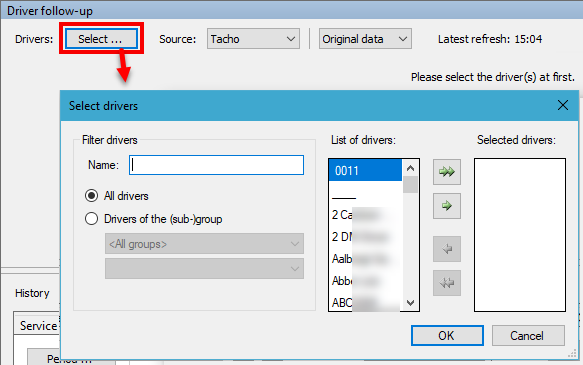
Driver selectionIf the total number of active drivers exceeds 100 (the limitation can be configured) in the "Driver Follow-up", "Saldo Viewer" or "Remaining times" module, you firstly need to select the drivers you want to visualize. TX-CONNECT will then only display the data for the selected drivers. Click on Select... to open the driver selection window and select your drivers. |
|

Map data updatePTV TOMTOM Europe 2020.T2: Updated toll tariffs (Belgium, Hungary, Slovakia and Bulgaria) and map data.
|

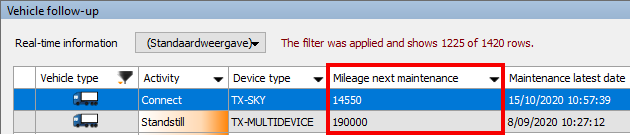
Mileage next maintenanceFor TX-GO and TX-SKY devices, the "Mileage next maintenance" column is updated automatically based on the available CAN bus data. (An active CAN bus connection is required for this functionality. The availability depends on the vehicle type and data availability on the CAN bus). Consult Available columns for more information on the columns in "Vehicle follow-up".
|
|

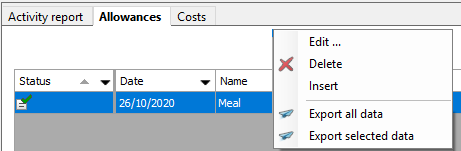
Edit allowanceUsers can now also edit an existing allowance. Right-click on an allowance and select Edit ... to adjust the parameters. Consult Edit allowance for more information. |
|
|
|
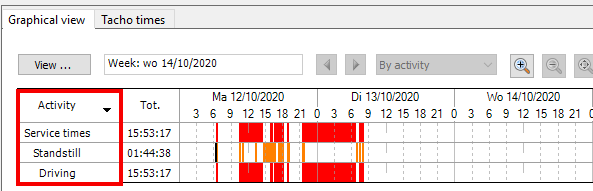
Graphical overviewFor improved visibility, the graphical overview in the "Activity Management" module only shows the activities with a duration. Activities with duration "00:00:00" are no longer shown in the graphical overview. This option is active by default. Consult Graphical view for more information. |
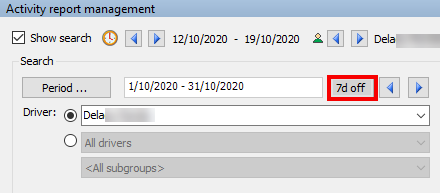
Search: Period selection shift 7 daysIn the "Activity Management" module, a toggle button was added in the search area. When selecting a period "From... Until.." or "Day", an extra button becomes available:
This option is not active by default and must be activated in the backoffice. Consult Selection area for more information. |
|

Language support: LithuanianAs from TX-CONNECT version 11.45.66, the TX-CONNECT application is also available in Lithuanian. Consult User Management for more information on the available user settings.
|
Subcontracting - Compatible devicesTX-TRAILERPULSE devices are now also available for subcontracting. Consult Subcontracting for more information on the subcontracting workflow.
|