|
PERSONALIZE REAL-TIME INFO IN |
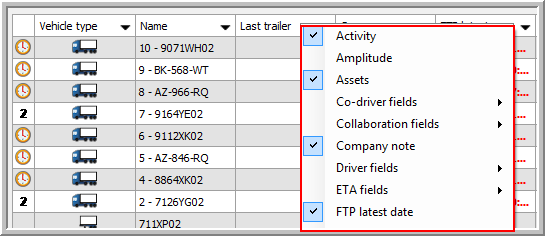
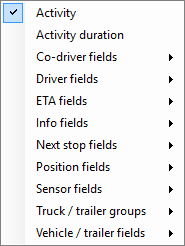
Right-click in the title bar and choose multiple columns at once to add them.
Note: Most of the info fields below can be added in the tooltip on the map. Consult Dynamic tooltip for more information.
|
|
Column group |
Field |
|||
|
Activity |
Activity |
||||
|
Activity duration (SKY only and Mixed Fleet environment) |
|||||
|
Amplitude (Fleet only - not active by default) |
Cf. Amplitude |
||||
|
Co-driver fields |
Co-driver Co-driver autofilter Co-driver latest date |
||||
|
Driver fields |
Driver Driver autofilter Driver code |
Driver group Driver latest date Tacho driver |
|||
|
ETA ETA destination ETA latest update |
ETA status Previous ETA
|
||||
|
Info fields |
Info 1 - 5 Info 1 - 5 Date |
||||
|
ETA next stop (incl. rest times) Name next stop Next +/- |
Next stop latest update Position of next stop RKM to next stop |
Source next stop STA next stop
|
|||
|
Position fields |
Position from address Position from city Position from street |
Position from town Position from village Position latest date |
|
||
|
(cf. Sensors) |
Anti-start Axle load (t) Battery status Coupled Door lock state |
EBS status Sensor 1 - 6 (°C) Sensor 1 - 6 date Sensor 7 - 12 (%) Sensor 7 - 12 date |
Temperature status Temperature status latest date |
||
|
Vehicle / trailer groups |
Select a vehicle / trailer group from the list to add it as a column in the overview. This provides a quick overview of the subgroups a vehicle / trailer belongs to. The available groups depend on the assigned vehicle / trailer groups (cf. Who tracks what). Consult Groups for more information on creating groups. |
||||
|
Vehicle / trailer fields |
Autofilter Code Company note Device type External code FTP latest date |
Fuel level Fuel level latest date GPRS latest date KM Last trailer Last vehicle Last vehicle date Latest trailer autofilter |
Latest trailer date License plate Maintenance latest date Mileage next maintenance Name Speed Status latest date Technical number |
Trailer group User note Vehicle group Vehicle type |
|
Some of the columns in the Field chooser are grouped. This allows you to select a group of columns and / or separate columns at once. Furthermore, a search field was added to the field chooser to easily search for items in the list.
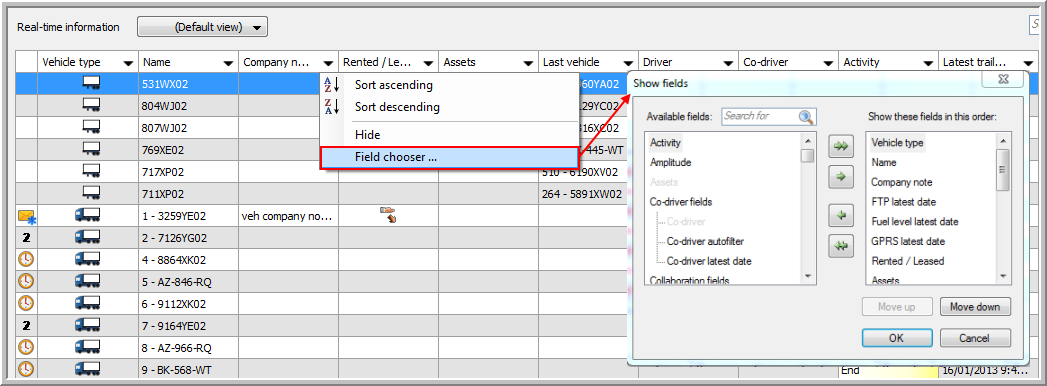
Several columns were renamed to make sure the most important information remains visible when resizing them.
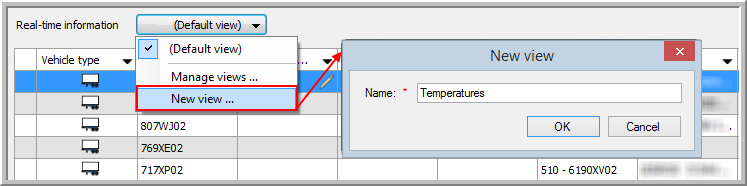
You can now create a personal view of the real-time information.
|
 |
|
 |
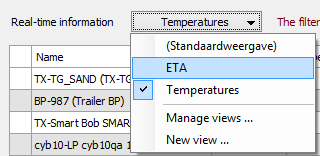
Under Manage views ..., you can copy, rename and delete views. |
 |
|
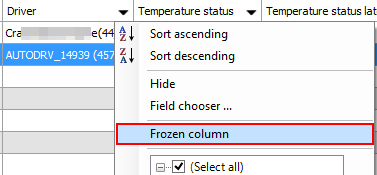
In the Driver follow-up and Vehicle follow-up windows it is possible to "freeze" certain columns. Click |
 |
|
By doing this, the frozen column will be positioned at the utmost left of the table so that the information in this column will remain visible at any time, even when scrolling all the way to the right. |
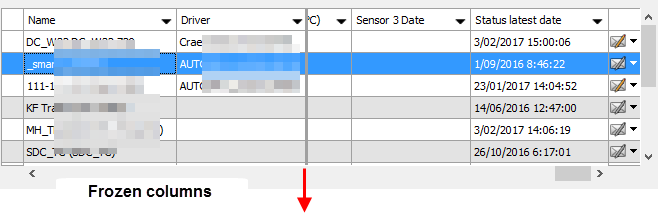
The frozen column(s) is (are) separated by a bold grey line at the right hand side. |
 in the column header of the column you want to freeze and select