|
VEHICLE MANAGEMENT |
It is possible to manage your vehicles in the module Settings > Management > Vehicles. Here you can add new and modify existing vehicles.
|
VISUALIZATION |
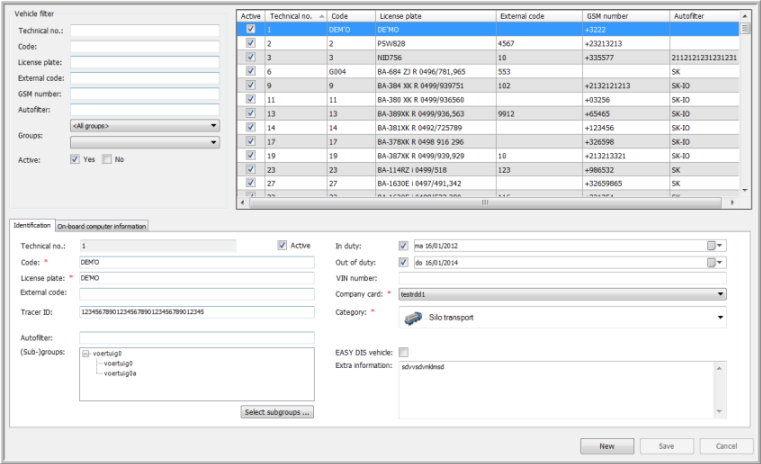
The screen is divided into three zones:
· The upper left zone contains the "Vehicle filter".
· The upper right zone contains the "Vehicle grid", showing the filter results.
· The lower zone contains two tab pages with detailed information on the selected vehicle and its on-board computer.
§ On-board computer information
♦ TX-SMART in a TX-MAX / Quattro+ or Mixed (TX-MAX / Quattro+ and TX-SKY) environment
♦ TX-SMART in a TX-SKY environment
At the bottom of the page, there are three buttons:
|
|
Create a new vehicle. |
|
|
Save a newly created or a modified vehicle. |
|
|
Undo the modifications made to a vehicle. The last saved values are restored. |
Back to Settings General overview
Related topics: How do I create a vehicle