|
IDENTIFICATION |
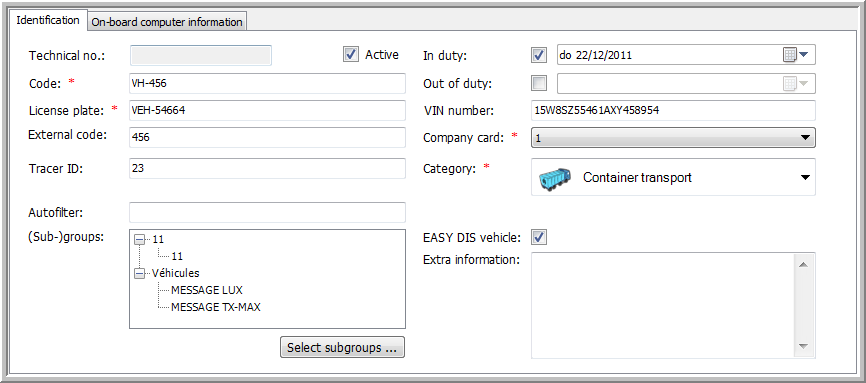
This tab page contains all detailed information on the vehicle.
As it is not possible to define the brand of the vehicle, it can be useful to create a vehicle group per brand under Settings > Management > Groups.
|
Parameters |
|
|
Technical no.: Active: |
The technical number is a code that is automatically generated by the software. It is used for assigning data to the correct vehicle. Deselect the checkbox to deactivate the vehicle (vehicles cannot be deleted). |
|
Code: |
An alphanumerical code for the vehicle, used for easy recognition of the vehicle in selection lists. The user is free to choose this code, but it must be unique. |
|
License plate: |
The vehicle's license plate (mandatory field). |
|
External code: |
The external code is the identification of the vehicle used by external programs. |
|
Tracer ID: |
The identification number of the Tracer device. When you create a new vehicle and fill in this field, the OBC type will be automatically set to "other". This is an easy way to create Tracers. |
|
Optional - The text in this field can be used for selection purposes throughout the software. Example: when selecting Autofilter = Light, we will select all vehicles with the text "Light" in the Autofilter field. This field can be linked to the group to which the vehicle belongs. |
|
|
(Sub)groups: |
(Sub)group(s) to which the vehicle belongs.
Note: When adding the new vehicle / trailer / driver / POI to a (sub)group you are tracking (cf. Settings > Management > Groups), it will be automatically tracked by the current user. As a result, you will not need to separately add it via “Who tracks what”. |
|
Set subgroups |
Select the subgroups |
|
In duty: |
When was the vehicle put into use? |
|
Out of duty: |
When was the vehicle taken out of use? |
|
VIN number: |
This is the Vehicle Identification Number or chassis number of the vehicle. |
|
Select the appropriate company card in case of multiple companies. Note that in case of an acquisition, each company keeps its own cards. Note: the company card must only specified if there are multiple company cards. |
|
|
For which type of transport is the vehicle used? This setting defines the displayed icon on the map. (mandatory field) |
|
|
EASY DIS vehicle: |
Enable data export to Easydis. |
|
Extra information: |
Extra information on the vehicle. |
|
VISUALISATION |
Related topics: How do I create a vehicle