|
OBC INFORMATION |
|
Parameters |
|
|
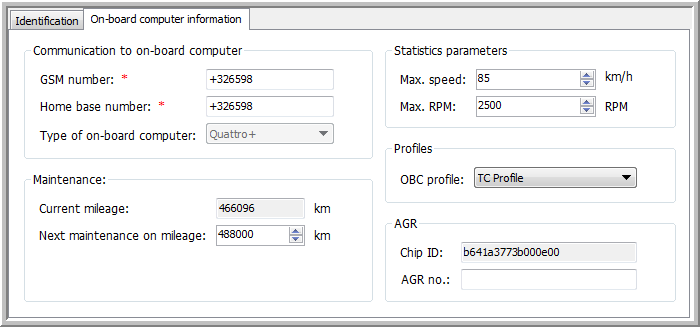
Communication to on-board computer |
|
|
GSM number: |
GSM number of the SIM card in the OBC. |
|
Home base number: |
GSM number of the SIM card at home base. Note that the last entered value will be remembered. |
|
Type of on-board computer: |
Type of OBC installed in the vehicle. If the "Tracer ID" field is filled in, the type of OBC will be automatically set to "Other". |
|
|
|
|
Maintenance |
|
|
Current mileage: x km |
The mileage from the vehicle, as received in real-time from the CAN Bus. |
|
Next maintenance on mileage: x km |
Manually entered distance before the next vehicle maintenance. |
|
|
|
|
Statistics reporting parameters |
|
|
Max. speed: x km/h |
Manual entry. Note that the last entered value will be remembered. |
|
Max. RPM: x RPM |
Manual entry. Note that the last entered value will be remembered. |
|
|
|
|
Profiles |
|
|
OBC profile: |
Select an OBC profile, created in |
|
|
|
|
AGR |
|
|
Chip ID: |
This is a unique identification number that is linked to the AGR No. This "ID" number is automatically filled in after the configuration of the on-board computer. |
|
AGR no.: |
You will receive this number from the Manure Bank. This is the official number that will be sent to the Manure Bank when using this vehicle. This number contains 8 characters. |
|
VISUALIZATION |