GENERAL OVERVIEW 11.41

New features

Vehicle follow-up

Truck and trailer data via CAN Gateway
(only for TX-SKY and mixed fleet)

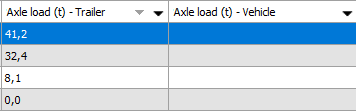
If a vehicle is equipped with the CAN Gateway hardware, additional EBS trailer data can be processed via the TX-SKY / TX-GO on-board computer.


In that case, when a trailer is connected to the vehicle (via WTR or via a question path entry), the trailer data are also visualized for the vehicle. As soon as the trailer is disconnected, the trailer data will be removed for the vehicle. The data are visualized in the "Vehicle follow-up" module in the "Axle load - Trailer" and "Axle load - Vehicle" columns and on the Sensor tab page.


Consult the Sensor tab page for more information.

No communication alarm for high-security transport
(only for TX-SKY and mixed fleet)

As from TX-CONNECT version 11.41, a new "No communication alarm" is available which is triggered when a device has not communicated for x minutes.


Consult Notification settings for more information.

Upload custom POIs to TX-SKY on-board computer
(only for TX-SKY and mixed fleet)

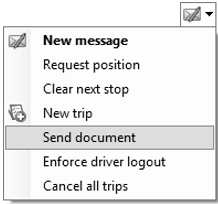
Using a specific POI file, you can upload custom POIs to the TX-SKY navigation.

The feature is limited to adding maximally 10 custom POI categories.


Consult Send a document for more information.

Two drivers (Double manning)
(only for TX-SKY and mixed fleet)

  • In case there are two drivers, they have a maximally allowed daily amplitude of 21 hours instead of 15 hours (single driver).

  • In case there are two drivers, the required daily rest is always 9 hours. The amount of reduced daily resting periods is only relevant for single manning (max. 3 times per week).
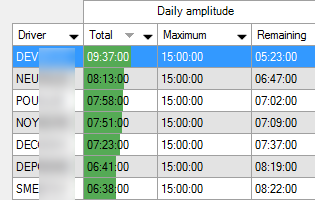

"Remaining times" module
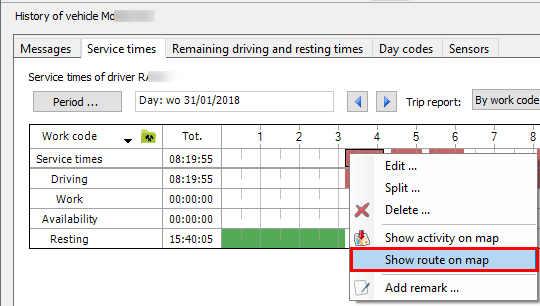
Show route on map from "Service times" tab in "Vehicle follow-up"
(only for TX-SKY and mixed fleet)

The "Show route on map" option is now also available from the "Service times" tab in the "Vehicle follow-up" module.
Activity report management

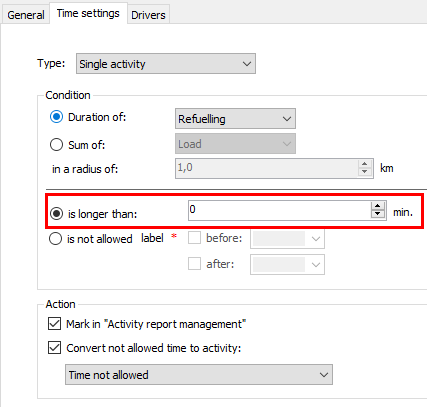
Duration of hour correction of 0 minutes is allowed
(only for TX-SKY and mixed fleet)

The allowed minimum value for an hour correction is now 0 minutes (instead of a minimum of 1 minute).


Consult "Hour corrections" > Time settings for more information.


Note: An activity converted to 0 minutes will still be visible in the activity report and any allowances registered via the question path of this activity will still be available in the back office software.

Graphical view: Monthly view - grouped per week
(only for TX-SKY and mixed fleet)

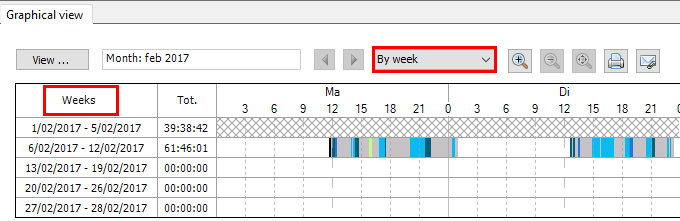
As from TX-CONNECT version 11.41, an additional option is available in the Graphical view and Tacho times tab pages in the "Activity report management" module.


When the selected period is larger than 7 days, the view can be grouped per week.

When selected, all weeks of the selected period are displayed under each other.


Consult Graphical view for more information.

Reload when saving
(only for TX-SKY and mixed fleet)

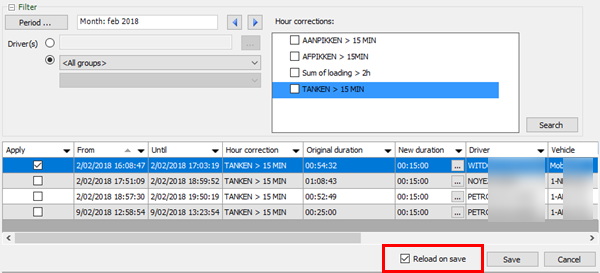
When processing hour corrections, you can choose if it is necessary to reload the hour correction when the data have been saved.


Consult Applying an hour correction for more information.

Map

New GeoFencing type: Safe zone departure
(only for TX-SKY)

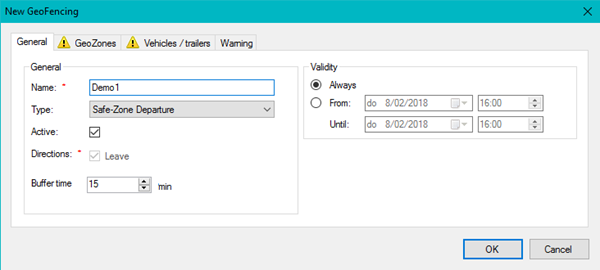
The Safe zone departure allows alerting the home base when a trailer leaves a specific area without being registered or authorized.


When a trailer leaves a "Safe zone" GeoFencing, the software automatically checks if the trailer is connected to a truck using the trailer ID (using automatic trailer recognition (WTR) or via the instruction set).


In case the trailer is not connected to a known (or subcontracted) truck, an alarm is triggered to report the unscheduled departure to the back office.


A "Safe zone departure" GeoFencing object can only be assigned to trailers equipped with TX-TRAILERGUARD or TX-TRACE.


Consult Safe zone departure for more information.