 The top zone provides a selection group box (to select period and vehicles).
|
MAILBOX GENERAL OVERVIEW |
The "Mailbox" window provides an overview of the message history for all vehicles and is divided into two zones:
The top zone provides a selection group box (to select period and vehicles).
 The bottom zone consists of two tab pages: Messages and Alarms.
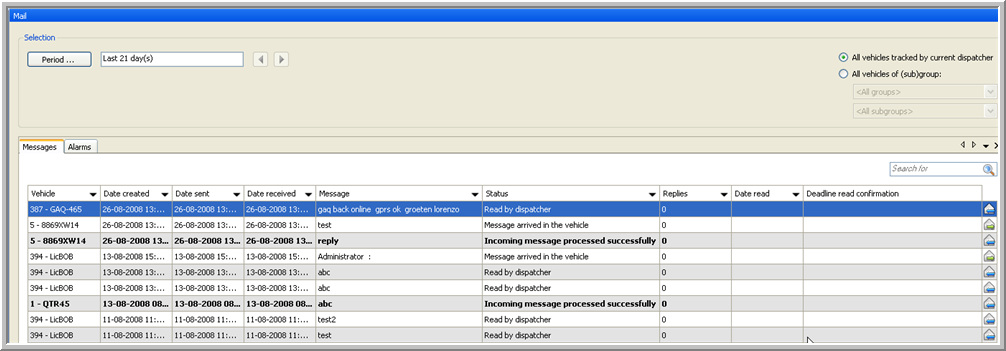
All vehicles tracked by current dispatcher
If this option is selected, all the messages 'from' and 'to' the vehicles tracked by the current dispatcher will be selected.
All vehicles of (sub)group
If you select this option, a list of all vehicles will be displayed in the Messages data grid. In the first drop-down list, you can select a group. The second one is to select a subgroup.
|
DETAIL ALARM |
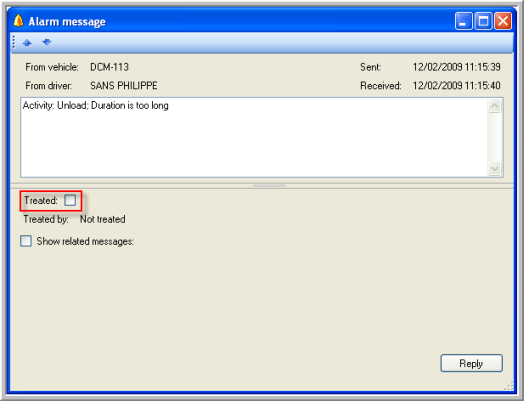
If you double-click an alarm in the Alarm tab, the "Alarm message" window opens, where you can tick a selection box if your alarm message has been treated.
|
ACTION BUTTONS |
means forwarding a message
means replying to a message